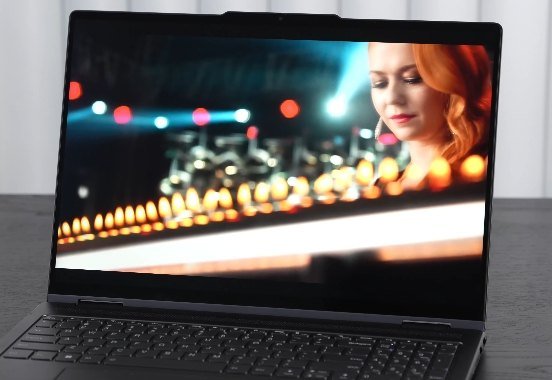
Lenovo Yoga 7i 16 (2023) Gen 8 Review

The Lenovo Yoga 7i 16-inch two-in-one convertible laptop features a Full HD Plus resolution with an optional QHD Plus upgrade that’s ideal for content creators.

Lenovo Yoga 7i 16-Inch Design

The Lenovo Yoga 7i 16 Gen 8 features a premium all-metal design and comes with a compact 65-watt USB Type-C charger. The laptop itself is striking with a sleek storm gray finish and a weight of 2.059kg and with the power adapter the total weight is 2.235kg.
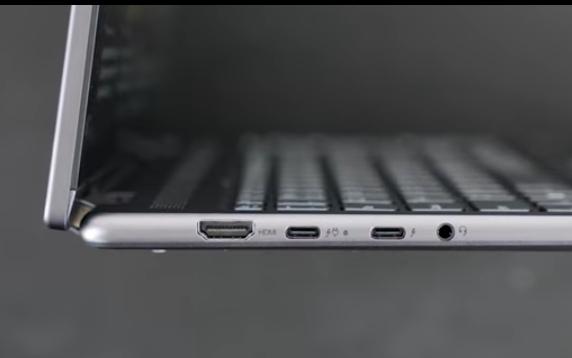
On the port front, the Lenovo Yoga 7i Gen 8 offers an HDMI 1.4 B port, two USB Type-C Thunderbolt 4 ports for data, charging, and display output, and a 3.5-millimeter microphone/headphone jack on the left side. The right side ports features the power button, a full-size SD card reader (plus a microSD card reader) and two USB-A ports. While HDMI 2.0 or higher would have been a nice addition, the port selection is generally satisfactory.

Lenovo Yoga 7i Gen 8 Keyboard and touchpad

Lenovo Yoga 7i Gen 8 opens easily with one finger, a rare convenience for convertible laptops. The keyboard features satisfactory key travel and retains the familiar smile-shaped keys of the Yoga line. It includes a numpad, which is useful for those who work with numbers, though it does slightly shift the touchpad off-center. This minor shift is not a significant issue for most users. The keyboard also offers a multi-stage backlight with white illumination helpful for typing in low light.

The touchpad is generously sized and high-quality, with a diving board-style design supports responsive two-finger scrolling and accurate gesture recognition ensuring a smooth user experience.

This laptop features a 1080p front-facing camera that supports face recognition login via Windows Hello adding convenience and security. There is also a fingerprint scanner below the keyboard that works reliably. And the physical shutter switch enhances privacy by allowing you to easily disable the camera when not in use.

There is an issue displaying Amazon products. Please contact the administrator to check that.

Display and Speakers

Lenovo Yoga 7i Gen 8 16-Inch Display

Lenovo Yoga 7i Gen 8 offers two display options a 2.5K IPS display with a 2560×1600 resolution and a 16:10 aspect ratio and a Full HD Plus IPS display with a 1920×1200 resolution and the same aspect ratio. The review unit I have features the Full HD Plus display.

For content creators working with Lightroom, Photoshop, or video editing, the higher resolution 2.5K display is preferable due to better color gamut coverage. The Full HD Plus display I tested has color coverage of 67% sRGB, 50% Adobe RGB, 50% DCI-P3, and 48% NTSC, which may be adequate for general use but falls short for high-end editing and color grading.

The Yoga 7i’s 16″ display provides excellent contrast, black levels, and a brightness of 300 nits. While the QHD Plus model offers 400 nits, this display is more than sufficient for media consumption, including Netflix, Amazon, and YouTube performs well overall and is durable.

The display runs at 60 Hz with no option for a higher refresh rate, which aligns with its price point. There are no OLED or 4K+ options available, as these are reserved for Lenovo’s higher-end models. Despite this, the Full HD Plus display is impressive for its price and performs well though the glossy surface may cause some glare and reflections.

The Yoga 7i is equipped with two 2-watt speakers and features Dolby Atmos technology for enhanced spatial audio. The dynamic mode delivers the best sound quality comparing it to the MacBook Pro 14 Lenovo Yoga 7i stands out as a strong choice in its class offering impressive audio performance for a Windows laptop.

The Modes and Pen

Lenovo Yoga 7i Modes

The touch layer on the Yoga 7i 16″ is highly responsive, making tasks like pinch-to-zoom and system navigation easy. You can also use a pen for note-taking and sketching, though it’s sold separately.

The pen performs well and adds value but the device’s weight can make it cumbersome as a tablet. The multiple modes: tent mode is great for following recipes or watching videos, stand mode is ideal for media consumption, and tablet mode works well with the pen. However, due to its size and weight, using it as a tablet can be a bit heavy, so it’s best used on a desk or table.

Upgradeability

The Lenovo Yoga 7i Gen 8 comes with up to 16GB of LPDDR5 RAM running in dual-channel mode. However, the RAM is soldered onto the motherboard and cannot be upgraded, which might be a drawback for a 16-inch laptop in 2023. And equipped with a PCIe Gen 4 SSD offering excellent read and write speeds.transparent;”> The SSD is user-upgradable allowing you to expand storage in the future if needed.

For wireless connectivity, the Yoga 7i 16 Gen 8 supports Wi-Fi 6E and Bluetooth 5.1 via a replaceable combo card. Both Wi-Fi and Bluetooth functions work flawlessly without any issues.

Performance and Benchmarks

PlatformsScores
PCMARK 106,000
GEEKBENCH 6 (Single-Coe)2,384
GEEKBENCH 6 (Multi-Core)9,351
CINEBENCH R203,075
CINEBENCH R151,264 CB | 115.66 FPS
CINEBENCH R231,859 Single-Core | 8,022 Multi-Core
3DMARK Fire Strike4,986
3DMARK Time Spy1,833
Benchmarks

The Lenovo Yoga 7i features an Intel 13th Gen Core i7 1355U processor with integrated Iris XE graphics. Despite being a 15-watt U-series processor, it delivers decent performance, though not as high as last year’s 28-watt Core i7 1260P. Both processors offer respectable single and multi-core scores making the Yoga 7i suitable for everyday tasks like Microsoft Office, email and web browsing.

Compared to the Core i7 1260P, the Core i7 1355U shows improvement in PC Mark 10 and Geekbench 6 single-core scores. However, the 1260P’s higher wattage and more cores (28 watts and 12 cores) result in better multi-core performance.

With a single-core score of 1859, the Yoga 7i performs well for daily tasks. However, its multi-core score of 8022 lags behind some 16-inch laptops, mainly due to the lack of a discrete GPU. The integrated Iris XE graphics make it unsuitable for high-settings gaming, though lowering the graphics settings may provide playable frame rates.

For external GPU connectivity, the laptop offers two USB Type-C Thunderbolt 4 ports, but this can increase the overall cost, making it less attractive compared to dedicated gaming laptops or those with discrete GPUs.

In terms of thermal performance, the Yoga 7i performed well in the Time Spy stress test with a score of 98.9 and no significant overheating issues. The laptop remained cool under heavy load, suitable for lap use, and the fan noise was reasonable, reaching around 44-45 decibels in performance mode and barely noticeable in balance or quiet modes.

Battery Life

LaptopsPCMARK 10 Modern OfficePCMARK 10 Video Playback
Lenovo Yoga 7i 16″ Gen 8|
71Wh, FHD+, Core i7-1355U
14 Hours 40 Minutes17 Hours 49 Minutes
Lenovo Yoga 7i 16″ Gen 7
71Wh, QHD+, Core i7-1260P
12 Hours 52 Minutes11 hours 01 Minutes

The standout feature of Lenovo Yoga 7i is the battery in the PCMark 10 Modern Office test, it lasted an impressive 14 hours and 40 minutes, and it performed even better in the video playback test with 17 hours and 49 minutes of runtime. Compared to last year’s model, which also had a 71 watt-hour battery, this year’s version shows significant improvement. Despite having the same battery size and a less powerful Core i7-1260p processor, it outperforms last year’s model, which lasted 12 hours and 52 minutes in the Modern Office test and 11 hours and 1 minute in the video playback test.

The improved battery life of the Full HD Plus model highlights its efficiency for those seeking even higher performance, the QHD Plus model with a Core i7 13th Gen processor is available. However, the Full HD Plus variant still offers excellent battery life easily lasting through a full day and beyond.

Final Thought

The Lenovo Yoga 7i 16-inch convertible laptop (Gen 8, 2023) offers several noteworthy features. It comes with a QHD+ IPS display option, but the Full HD+ version reviewed here is sufficient for most users. One of its standout features is its good battery life and both single and multi-core performance handle everyday tasks well.

The laptop includes a good range of ports and a 1080p IR webcam with face recognition for easy login. Starting at 9.99, it’s an affordable choice with a durable all-metal build and versatile convertible design. However, the Full HD+ display may lack color gamut coverage, which could be a drawback for content creators. For most users not focused on color accuracy, it should be adequate. The laptop is also somewhat heavy as a tablet.

Leave a Comment

Lenovo Yoga 7i 16 (2023) Gen 8 Review

The Lenovo Yoga 7i 16-inch two-in-one convertible laptop features a Full HD Plus resolution with an optional QHD Plus upgrade that’s ideal for content creators.

Lenovo Yoga 7i 16-Inch Design

The Lenovo Yoga 7i 16 Gen 8 features a premium all-metal design and comes with a compact 65-watt USB Type-C charger. The laptop itself is striking with a sleek storm gray finish and a weight of 2.059kg and with the power adapter the total weight is 2.235kg.

On the port front, the Lenovo Yoga 7i Gen 8 offers an HDMI 1.4 B port, two USB Type-C Thunderbolt 4 ports for data, charging, and display output, and a 3.5-millimeter microphone/headphone jack on the left side. The right side ports features the power button, a full-size SD card reader (plus a microSD card reader) and two USB-A ports. While HDMI 2.0 or higher would have been a nice addition, the port selection is generally satisfactory.

Lenovo Yoga 7i Gen 8 Keyboard and touchpad

Lenovo Yoga 7i Gen 8 opens easily with one finger, a rare convenience for convertible laptops. The keyboard features satisfactory key travel and retains the familiar smile-shaped keys of the Yoga line. It includes a numpad, which is useful for those who work with numbers, though it does slightly shift the touchpad off-center. This minor shift is not a significant issue for most users. The keyboard also offers a multi-stage backlight with white illumination helpful for typing in low light.

The touchpad is generously sized and high-quality, with a diving board-style design supports responsive two-finger scrolling and accurate gesture recognition ensuring a smooth user experience.

This laptop features a 1080p front-facing camera that supports face recognition login via Windows Hello adding convenience and security. There is also a fingerprint scanner below the keyboard that works reliably. And the physical shutter switch enhances privacy by allowing you to easily disable the camera when not in use.

There is an issue displaying Amazon products. Please contact the administrator to check that.

Display and Speakers

Lenovo Yoga 7i Gen 8 16-Inch Display

Lenovo Yoga 7i Gen 8 offers two display options a 2.5K IPS display with a 2560×1600 resolution and a 16:10 aspect ratio and a Full HD Plus IPS display with a 1920×1200 resolution and the same aspect ratio. The review unit I have features the Full HD Plus display.

For content creators working with Lightroom, Photoshop, or video editing, the higher resolution 2.5K display is preferable due to better color gamut coverage. The Full HD Plus display I tested has color coverage of 67% sRGB, 50% Adobe RGB, 50% DCI-P3, and 48% NTSC, which may be adequate for general use but falls short for high-end editing and color grading.

The Yoga 7i’s 16″ display provides excellent contrast, black levels, and a brightness of 300 nits. While the QHD Plus model offers 400 nits, this display is more than sufficient for media consumption, including Netflix, Amazon, and YouTube performs well overall and is durable.

The display runs at 60 Hz with no option for a higher refresh rate, which aligns with its price point. There are no OLED or 4K+ options available, as these are reserved for Lenovo’s higher-end models. Despite this, the Full HD Plus display is impressive for its price and performs well though the glossy surface may cause some glare and reflections.

The Yoga 7i is equipped with two 2-watt speakers and features Dolby Atmos technology for enhanced spatial audio. The dynamic mode delivers the best sound quality comparing it to the MacBook Pro 14 Lenovo Yoga 7i stands out as a strong choice in its class offering impressive audio performance for a Windows laptop.

The Modes and Pen

Lenovo Yoga 7i Modes

The touch layer on the Yoga 7i 16″ is highly responsive, making tasks like pinch-to-zoom and system navigation easy. You can also use a pen for note-taking and sketching, though it’s sold separately.

The pen performs well and adds value but the device’s weight can make it cumbersome as a tablet. The multiple modes: tent mode is great for following recipes or watching videos, stand mode is ideal for media consumption, and tablet mode works well with the pen. However, due to its size and weight, using it as a tablet can be a bit heavy, so it’s best used on a desk or table.

Upgradeability

The Lenovo Yoga 7i Gen 8 comes with up to 16GB of LPDDR5 RAM running in dual-channel mode. However, the RAM is soldered onto the motherboard and cannot be upgraded, which might be a drawback for a 16-inch laptop in 2023. And equipped with a PCIe Gen 4 SSD offering excellent read and write speeds.transparent;”> The SSD is user-upgradable allowing you to expand storage in the future if needed.

For wireless connectivity, the Yoga 7i 16 Gen 8 supports Wi-Fi 6E and Bluetooth 5.1 via a replaceable combo card. Both Wi-Fi and Bluetooth functions work flawlessly without any issues.

Performance and Benchmarks

PlatformsScores
PCMARK 106,000
GEEKBENCH 6 (Single-Coe)2,384
GEEKBENCH 6 (Multi-Core)9,351
CINEBENCH R203,075
CINEBENCH R151,264 CB | 115.66 FPS
CINEBENCH R231,859 Single-Core | 8,022 Multi-Core
3DMARK Fire Strike4,986
3DMARK Time Spy1,833
Benchmarks

The Lenovo Yoga 7i features an Intel 13th Gen Core i7 1355U processor with integrated Iris XE graphics. Despite being a 15-watt U-series processor, it delivers decent performance, though not as high as last year’s 28-watt Core i7 1260P. Both processors offer respectable single and multi-core scores making the Yoga 7i suitable for everyday tasks like Microsoft Office, email and web browsing.

Compared to the Core i7 1260P, the Core i7 1355U shows improvement in PC Mark 10 and Geekbench 6 single-core scores. However, the 1260P’s higher wattage and more cores (28 watts and 12 cores) result in better multi-core performance.

With a single-core score of 1859, the Yoga 7i performs well for daily tasks. However, its multi-core score of 8022 lags behind some 16-inch laptops, mainly due to the lack of a discrete GPU. The integrated Iris XE graphics make it unsuitable for high-settings gaming, though lowering the graphics settings may provide playable frame rates.

For external GPU connectivity, the laptop offers two USB Type-C Thunderbolt 4 ports, but this can increase the overall cost, making it less attractive compared to dedicated gaming laptops or those with discrete GPUs.

In terms of thermal performance, the Yoga 7i performed well in the Time Spy stress test with a score of 98.9 and no significant overheating issues. The laptop remained cool under heavy load, suitable for lap use, and the fan noise was reasonable, reaching around 44-45 decibels in performance mode and barely noticeable in balance or quiet modes.

Battery Life

LaptopsPCMARK 10 Modern OfficePCMARK 10 Video Playback
Lenovo Yoga 7i 16″ Gen 8|
71Wh, FHD+, Core i7-1355U
14 Hours 40 Minutes17 Hours 49 Minutes
Lenovo Yoga 7i 16″ Gen 7
71Wh, QHD+, Core i7-1260P
12 Hours 52 Minutes11 hours 01 Minutes

The standout feature of Lenovo Yoga 7i is the battery in the PCMark 10 Modern Office test, it lasted an impressive 14 hours and 40 minutes, and it performed even better in the video playback test with 17 hours and 49 minutes of runtime. Compared to last year’s model, which also had a 71 watt-hour battery, this year’s version shows significant improvement. Despite having the same battery size and a less powerful Core i7-1260p processor, it outperforms last year’s model, which lasted 12 hours and 52 minutes in the Modern Office test and 11 hours and 1 minute in the video playback test.

The improved battery life of the Full HD Plus model highlights its efficiency for those seeking even higher performance, the QHD Plus model with a Core i7 13th Gen processor is available. However, the Full HD Plus variant still offers excellent battery life easily lasting through a full day and beyond.

Final Thought

The Lenovo Yoga 7i 16-inch convertible laptop (Gen 8, 2023) offers several noteworthy features. It comes with a QHD+ IPS display option, but the Full HD+ version reviewed here is sufficient for most users. One of its standout features is its good battery life and both single and multi-core performance handle everyday tasks well.

The laptop includes a good range of ports and a 1080p IR webcam with face recognition for easy login. Starting at 9.99, it’s an affordable choice with a durable all-metal build and versatile convertible design. However, the Full HD+ display may lack color gamut coverage, which could be a drawback for content creators. For most users not focused on color accuracy, it should be adequate. The laptop is also somewhat heavy as a tablet.