

Thinking about upgrading your M2 iPad Pro to the new M4 model? The latest iPad Pro is more than just a minor refresh. We’ve put both tablets to the test, comparing everything from performance and display to new accessories, to help you decide if the M4 is the right choice for you.
Design and Build: Thinner and Lighter, but Is It Noticeable?
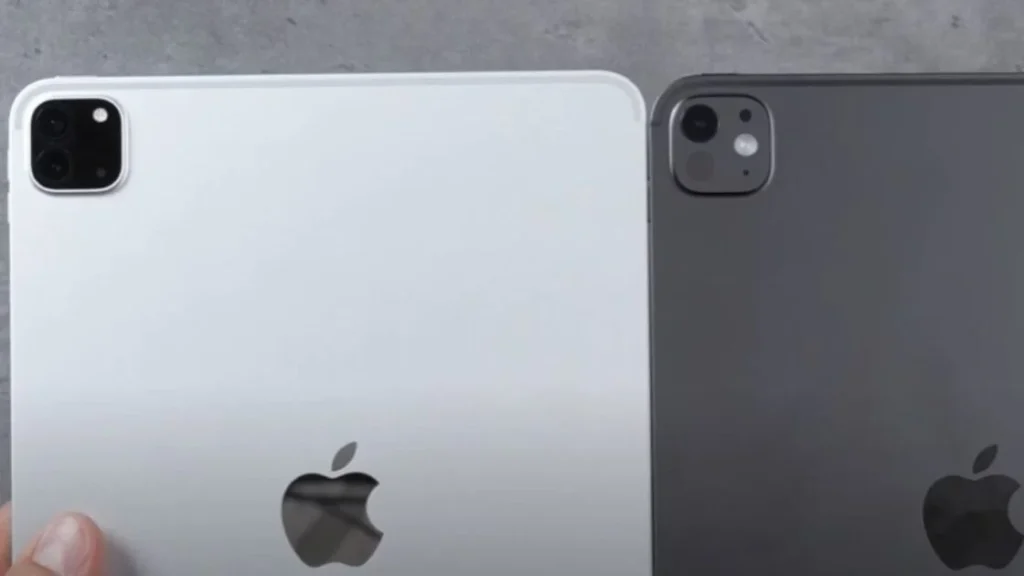
Apple made a big deal about the M4 iPad Pro’s new design, making it the thinnest Apple product ever. While the numbers show a significant reduction in thickness (5.3mm vs. 5.9mm), you might not notice a huge difference in your hand. The biggest change is a slight weight reduction, especially on the 13-inch model.
A notable design change is the removal of the ultrawide rear camera on the M4 model. While this might be a concern for some, many users found they rarely used this feature.
Display: OLED is a Game-Changer
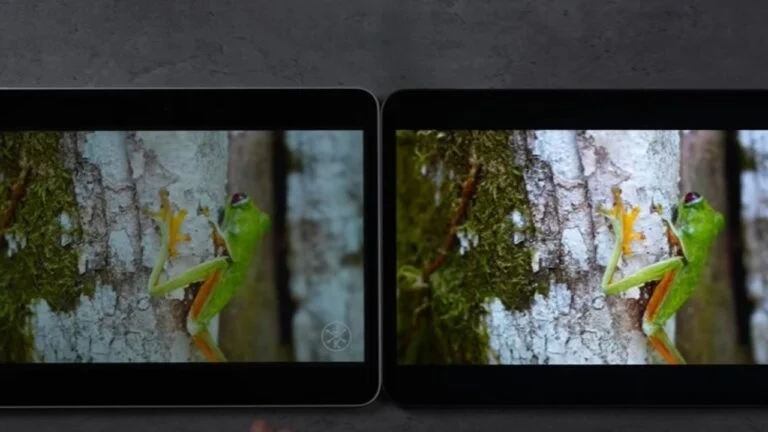
The new Ultra Retina XDR display is the most significant upgrade on the M4 iPad Pro.
- Nano-Texture Option: For professional users, the M4 offers a nano-texture glass option on higher-capacity models to further minimize glare.
- LCD vs. OLED: The M4 brings OLED technology to the 11-inch iPad Pro for the first time. This means you get true blacks, incredible contrast, and vibrant colors that an LCD screen simply can’t match.
- Brightness and Anti-Reflectivity: The M4’s screen is not only brighter for HDR content (up to 1,600 nits) but also has a new anti-reflective coating that dramatically reduces glare, making it much more usable outdoors or in bright rooms.


Note: We have included Amazon affiliate links. When you make a purchase through these links, we may earn a commission at no extra cost to you.
The New Accessories: Apple Pencil Pro and Magic Keyboard
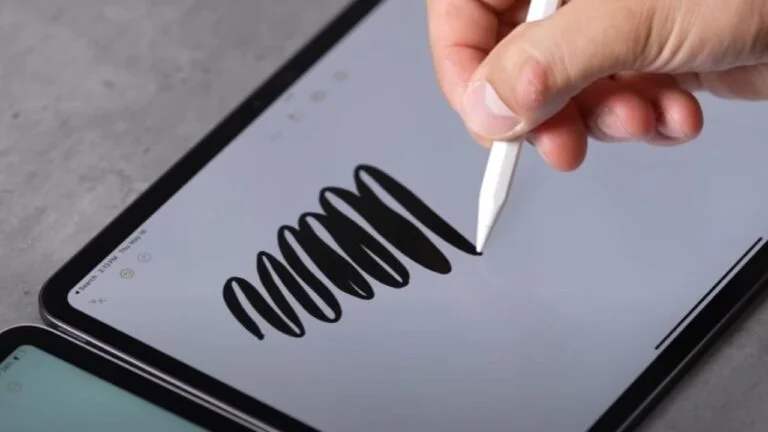
The M4 iPad Pro requires new accessories, and they bring key improvements.
Apple Pencil Pro: The new Pencil Pro features a “squeeze” function with haptic feedback for quick tool changes. It also has a “barrel roll” feature for more realistic brush control and a latency of just 5 milliseconds on the OLED display, a noticeable improvement for artists. The addition of Find My support is a great bonus for anyone prone to misplacing their stylus.
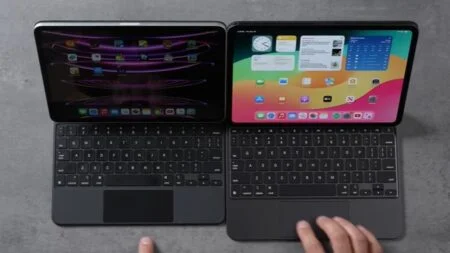
Magic Keyboard: The redesigned Magic Keyboard is more durable with an aluminum build, a larger trackpad that feels more like a MacBook, and a dedicated function row for quick access to controls like brightness and volume.
Performance: M4 vs. M2 Chipset
The M4 chip delivers impressive performance gains, particularly for demanding tasks.
| Benchmark | M2 iPad Pro (8-core) | M4 iPad Pro (9-core) | Improvement |
| Geekbench Single-Core | 2,601 | 3,710 | 42% faster |
| Geekbench Multi-Core | 10,032 | 13,251 | 32% faster |
| 3DMark Solar Bay (Ray Tracing) | 32.4 FPS | 58 FPS | 80% faster |
CPU & GPU: The M4’s new 9-core CPU and 10-core GPU, built on a more efficient 3-nanometer process, provide a significant boost in both single-core and multi-core performance.
Ray Tracing: The M4’s GPU now has hardware-accelerated ray tracing, which provides a massive performance leap in compatible games and graphics applications.
Real-World Speed: In tasks like exporting 4K video in Final Cut Pro and processing raw photos in Lightroom, the M4 consistently outperforms the M2. It completed a Lightroom export 34% faster and a Final Cut Pro project 15% faster.
Thermal Management: Despite its thinner design, the M4 iPad Pro dissipates heat more effectively, avoiding the thermal throttling issues seen in the M2 and maintaining higher sustained performance.
SSD Jazz Disc Performance
I want to start out with the storage. The nice thing about the new one, even though you pay more, is it starts out with 256 GB instead of 128 GB. So let’s go ahead and see the performance difference.
| M2 iPad Pro 128GB 8-core | 1,615 |
| M4 iPad Pro 256GB 9-core | 1,635 |
Now, in terms of read speed, you guys can see it’s almost the same, but in terms of write speed, it’s almost double the performance, which would have been the same if you had upgraded the M2 iPad Pro.
Geekbench 6 CPU
In Geekbench, both processors have 8 GB of RAM. Upgrading to at least a terabyte increases this to 16 GB. The M2 runs at 3.49 GHz, while the newer model runs at 4.4 GHz, marking a significant performance difference. The current model features a 9-core CPU, compared to the M2’s 8-core, with two extra efficiency cores but one fewer performance core unless you opt for the pricey 1 TB version.
| M2 iPad Pro 128GB 8-core | 2,601 |
| M4 iPad Pro 256GB 9-core | 3,710 |
| M2 iPad Pro 128GB 8-core | 10,032 |
| M4 iPad Pro 256GB 9-core | 13,251 |
The performance numbers for the M4 are impressive. It is 42% faster in single-core tasks, outperforming even the fastest overclocked Intel water-cooled processors. In multicore tasks, it is 32% faster, despite having only three performance cores compared to four in its competitors.
GEEKBENCH 6 Metal GPU
Both have 10 cores, but the new one uses a second-gen 3-nanometer process compared to the M2’s 5-nanometer process, offering slightly better efficiency.
The difference in graphics performance is about 16%, thanks to the same core count but improved efficiency, impacting general compute performance.
| M2 iPad Pro 128GB 8-core | 46,586 |
| M4 iPad Pro 256GB 9-core | 53,978 |
3DMark Solar Bay Ray Tracing
| M2 iPad Pro 128GB 8-core | 32.4 FPS |
| M4 iPad Pro 256GB 9-core | 58 FPS |
One significant improvement is the addition of ray tracing, along with other enhancements. I’ll test Solar Bay in 3D Mark, which uses ray tracing. It should not only be faster but also more efficient than software ray tracing. The results show 58 FPS compared to 32.4 FPS, indicating an 80% better performance with reduced battery usage.
3DMark Wild Life Extreme
If you are going to be gaming, we will test Wildlife Extreme, a 20-minute stress test, to check for thermal throttling with the increased performance.
| M2 iPad Pro 128GB 8-core | 6,358 |
| M4 iPad Pro 256GB 9-core | 8,557 |
| M2 iPad Pro 128GB 8-core | 4,294 |
| M4 iPad Pro 256GB 9-core | 6,241 |
The performance gap is significant. Instead of a 16% increase in metal, we see a 35% boost in our highest score, jumping from 6358 to 8557. Even after thermal throttling, the graphics performance shows a 45% improvement compared to its predecessor. Despite being thinner, it manages heat better than the M2. Overall, it excels in every aspect, which is a relief, while also conserving battery power. In my tests using Lightroom Mobile, handling 50 raw, effect-laden 42-megapixel images, the M4 proves noticeably faster.
| M2 iPad Pro 128GB 8-core | 3 minutes 24 seconds |
| M4 iPad Pro 256GB 9-core | 2 minutes 34 seconds |
Final Cut Pro For iPad Export
I have Final Cut Pro open with an almost 8-minute project featuring various clips, effects, and corrections. The graphics performance shows a mere 16% difference. Now, we’re testing if Apple updated the encoders or decoders on the new M4 with a 4K project using identical settings.
| M2 iPad Pro 128GB 8-core | 3 minutes 29 seconds |
| M4 iPad Pro 256GB 9-core | 3 minutes 02 seconds |
The M2 iPad took 15% longer at 3 minutes and 29 seconds compared to the M1 iPad’s 3 minutes and 2 seconds. While the encoding speed may not have been updated significantly, there is a noticeable 16% increase in compute performance, possibly due to improved graphics capabilities.
Moreover, the new iPad allows for HDR video editing on an 11-inch device, which was not possible with an LCD screen due to color accuracy limitations. This enhancement makes the device much more capable for high-quality and accurate video editing tasks, although the speed improvement is marginal.
Cameras and Battery
The M4 iPad Pro’s front-facing camera is now on the landscape edge, making it much more natural for video calls. The new adaptive True Tone flash on the rear camera is designed to improve document scanning quality.
While the M4 has a slightly larger battery, the rated battery life remains the same as the M2. This is likely due to the increased power and new display features, but it’s impressive that the thinner design didn’t lead to a decrease in battery performance.
Final Verdict: Should You Upgrade?
The M4 iPad Pro is a major leap forward from the M2 model, offering significant upgrades in display quality and raw performance.
- If you have an M2 iPad Pro: The M2 is still an incredibly capable tablet, and the upgrade isn’t necessary for most everyday tasks. However, if you are a creative professional who relies on your iPad for demanding workflows like video editing, 3D rendering, or complex artwork, the M4’s speed and the new OLED display are worth the investment.
- If you’re buying a new iPad Pro: The M4 is a no-brainer. The base model now starts with 256GB of storage, and the improvements in performance, display, and accessories make it a much more future-proof device. Even with the cost of new accessories, the M4 offers a far superior and more long-lasting experience.